Your business may already appear in ChatGPT, even if you have never added it yourself. The next step is finding out whether you can claim that listing and manage the information attached to it.
OpenAI has introduced Businesses in ChatGPT, with a Business Hub for eligible businesses to claim their profile and provide current information.
Access is still rolling out. Some Australian claim attempts have reached a waitlist, while we have also been able to create a draft profile for WPM247 and access its business overview. Finding or adding your business does not mean it is fully verified or published.
Updated 11 November 2026. The service is in beta, and access may vary by business type, location and account.
Already on Google? Start by looking for your existing listing
If your business has a Google Business Profile, it appears worth checking whether an existing listing is available to claim in ChatGPT.
Search using the same business name you use on Google, then check the address and website against your own details. Your business may already be listed, saving you from starting with a new profile.
However, a Google listing should not be treated as automatic approval. OpenAI has not confirmed that every business on Google is eligible, or that Google Business Profile is the source of every ChatGPT listing.
The practical takeaway is simple: if customers can find you on Google, try searching for your business in ChatGPT Business Hub too. Finding a matching listing is the starting point; claiming and verification are separate steps.
Start by finding or adding your business
Visit ChatGPT Business Hub and sign in with the account you intend to use to manage your business.
Search for your business name and select the correct result if it appears. Take a moment to confirm you have chosen your business, particularly if other companies have a similar name.
Follow the claim prompts shown in your account. If you reach the waitlist screen, register your interest and watch for an email explaining when you can continue.
At this stage, joining the waitlist does not mean your business has been verified or that profile management is active. An Australian launch-day report on 11 November 2026 reached this waitlist. Our WPM247 setup progressed to a draft profile, so the experience can differ depending on the business and setup path.
As access opens, OpenAI’s setup guidance describes verification options such as a business phone, business email, website domain or Shopify connection. The options offered depend on the business, and further identity verification may be required before you can publish changes.
Have your DNS manager ready
If you are adding or verifying your business through the website domain option, it appears you will need to add a DNS TXT record to prove you control the domain. OpenAI’s setup guidance confirms this requirement for domain verification, although other verification methods may be offered.
Before starting, have access to wherever your domain’s DNS records are managed. That might be Cloudflare, your domain registrar or your hosting provider. If your web developer or IT provider manages DNS for you, have them available to add the record when needed.
ChatGPT will provide the TXT record details. Copy the host/name and value exactly into your DNS manager, then return to complete verification. DNS changes can take time to become visible, so verification may not happen immediately.
What if your business does not appear?
Check your spelling, try your trading name and look for any variations used publicly.
OpenAI says eligible online businesses may see an option to add a business. That option is not available to every business or location, so avoid assuming there is a universal “add listing” process for Australian local businesses.
If you cannot find a matching result and no suitable option appears, check back as access expands.
Be prepared to verify your identity with government-issued ID
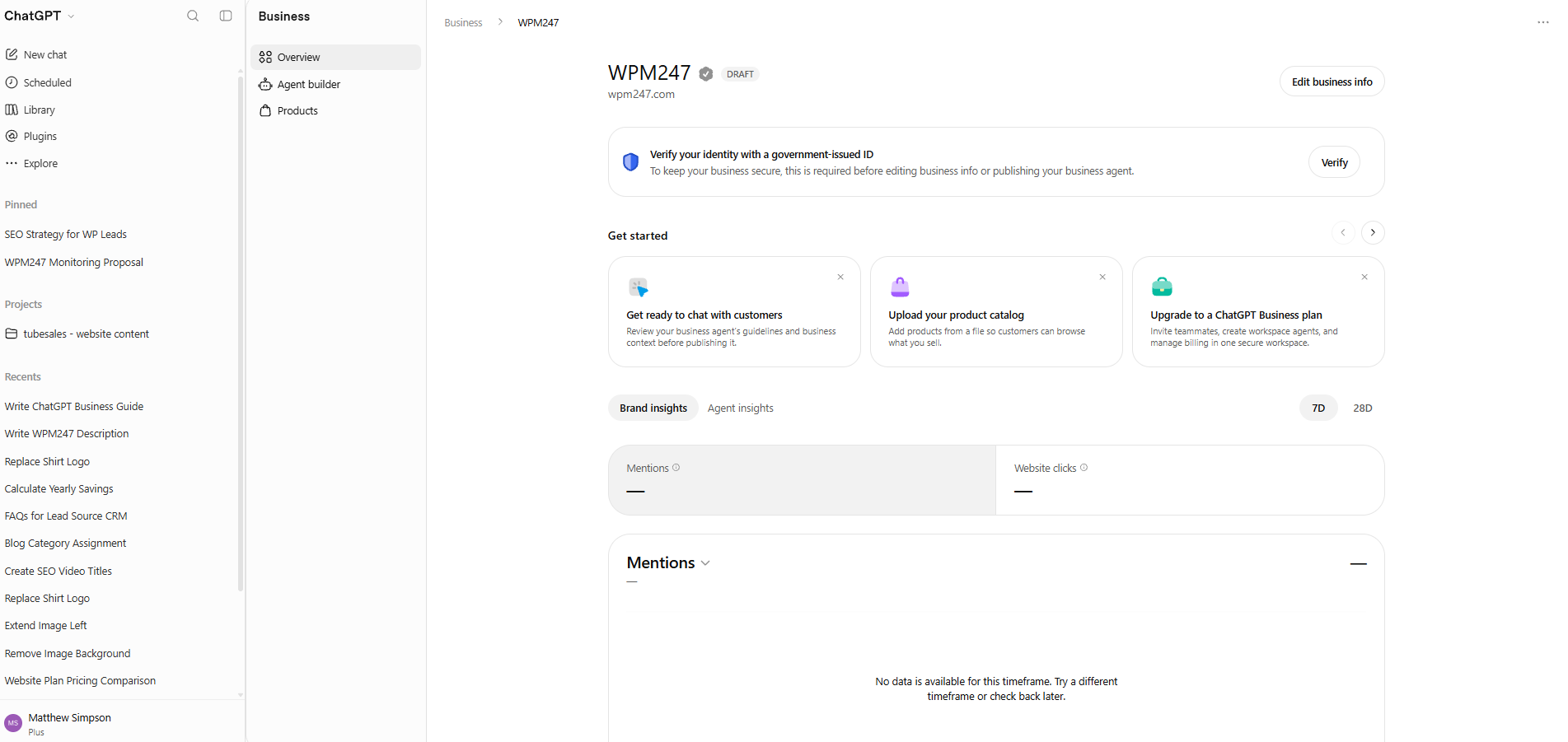
Creating a draft business profile appears to be only part of the process. In our WPM247 business overview, ChatGPT displays a request to verify identity with a government-issued ID.
The notice says this is required before editing business information or publishing a business agent. Have suitable ID available if you intend to complete the setup, and follow the verification requirements shown in your account. Creating the draft itself should not be confused with completing identity verification.
What appears after adding your business?
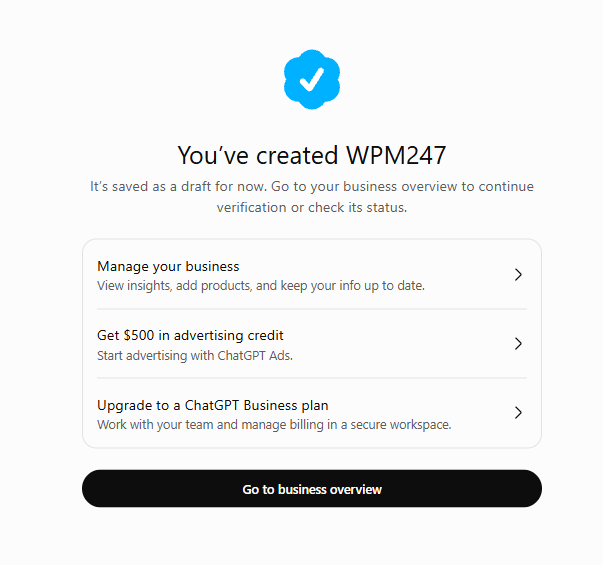
Our WPM247 setup revealed more than a basic listing. After creating the business, ChatGPT displayed options to manage the profile, add products and explore advertising.
An offer of $500 in advertising credit
The confirmation screen included an option labelled “Get $500 in advertising credit”, linking to ChatGPT Ads.
This appears to be an advertising offer presented after business creation. The screen alone does not confirm the currency, eligibility, qualifying spend, expiry or other conditions, so check the offer details before treating the credit as available to your business. It also does not mean a campaign has been created or credit has already been applied.
Individual products and product catalogues
The product area appears to support adding individual products as well as uploading a product catalogue. The business overview also includes an “Upload your product catalog” prompt, describing the option to add products from a file so customers can browse what you sell.
The product setup information indicates that submitted product information can help ChatGPT list or suggest relevant products in its answers. For retailers, this could provide a way to supply details about what they sell directly, rather than relying only on information found elsewhere.
Uploading products should still be treated as providing information for potential use. It does not guarantee that a product will appear in an answer, receive preferential placement or generate sales.
What would claiming your business actually change?
The main benefit is having a way to provide accurate information about your business.
Once the required approvals are complete, eligible businesses can update profile details and access available insights. Depending on access, those insights can include business mentions, website clicks and the topics associated with discovery.
For a business owner, this could help answer useful questions: are people finding us through ChatGPT, what are they researching, and are they clicking through to our website?
Claiming a profile does not guarantee that ChatGPT will recommend your business more often. OpenAI says recommendations remain independent, and ChatGPT may use other sources alongside the information a business supplies.
Why secure your profile before the full picture is clear?
Right now, there is no confirmed indication that simply claiming your business will make it appear more frequently in ChatGPT results or recommendations. Product submissions offer a separate way to provide information that may be used in relevant answers, but that is not a promise of more frequent recommendations. OpenAI explicitly says claiming does not guarantee higher placement or sales.
There is also more to learn about how these profiles will ultimately be used as the platform develops. Could they become a more prominent part of how customers discover businesses, compare services or make contact? Possibly. Those are potential directions, rather than promised outcomes.
Even with that uncertainty, getting the process started now is a sensible preparation step. Joining the waitlist, then completing your claim when access becomes available, could put you in a better position to keep your details current and assess new features as they arrive.
Our view is to secure your business profile when eligible and build from there. The immediate value is establishing access to manage your information; any future visibility or lead generation benefit remains to be seen.
Get your business ready for the next step
If you already have a Google listing, checking ChatGPT Business Hub is a sensible first action. Your business may already be there, with an option to begin the claim process.
For now, Australian businesses should expect a staged rollout and a possible waitlist. Registering interest is an early step, with access and verification still to follow. If your setup allows you to continue, you may be able to create a draft and explore the available tools now. Getting organised – including having your DNS access and government-issued ID ready – can help you complete the next steps when available.
At Sympley, we help businesses build clear, effective websites that turn visitor interest into enquiries. If your website needs clearer service information, stronger trust signals or an easier path to contact, get in touch with Sympley.